
Appearance
PySpark Specifics
Crossing the JVM/Python boundary
A plain PySpark UDF runs one row at a time in a separate Python process, and getting each row there costs something real: "PySpark UDFs required data movement between the JVM and Python, which was quite expensive," using pickle to serialize the data across that boundary[1]. Spark: The Definitive Guide breaks the cost down further. Starting the extra Python process is one expense, but "the real cost is in serializing the data to Python," and once the data is over there the JVM can no longer manage that worker's memory, so JVM and Python end up competing for the same machine's RAM and the worker can fail under pressure[2]. That's the underlying reason the same source recommends writing UDFs in Scala or Java and calling them from Python when that's practical[2:1].
Since Spark 3.4 the row-at-a-time path can itself be Arrow-optimized without giving up row semantics: set useArrow=True on udf(), or flip the session-wide spark.sql.execution.pythonUDF.arrow.enabled (default false), and a regular Python UDF becomes an "Arrow Python UDF" that still runs row by row but moves data with Arrow instead of pickle[3][4]. The session config only takes effect when useArrow is left unset on the UDF itself[3:1].
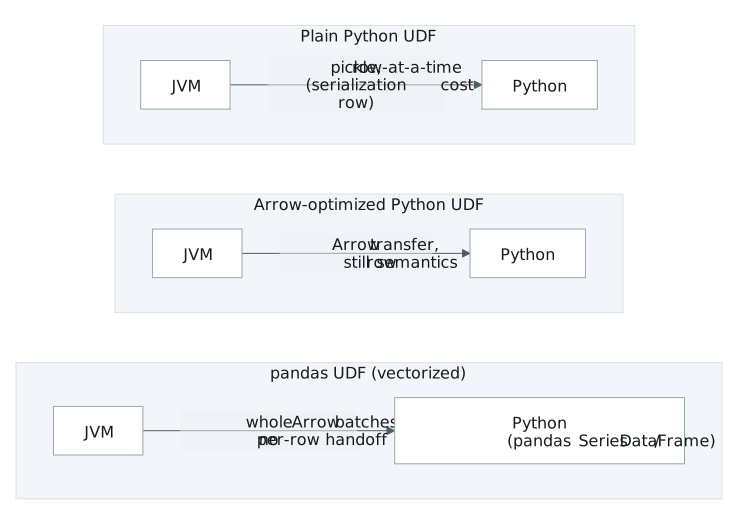
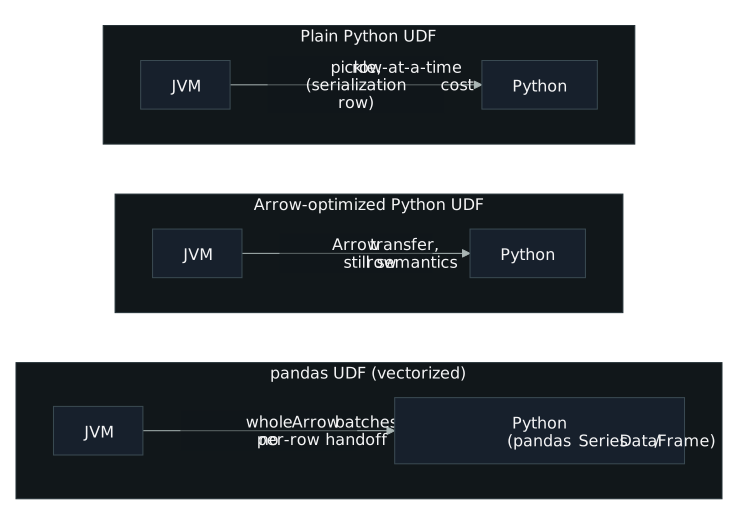
The pandas UDF (vectorized UDF, introduced in Spark 2.3) goes further and drops the per-row JVM↔Python handoff entirely: it hands the Python worker whole Arrow batches, operated on as pandas Series or DataFrames, so there's nothing to pickle row by row[1:1]. Three shapes cover most cases. SCALAR (pandas.Series, ... -> pandas.Series) is the direct vectorized swap-in for a row-at-a-time scalar UDF (computing v + 1, or cubed(x)); PySpark calls the function once per Arrow batch and concatenates the results back into a column[5][1:2]. SCALAR_ITER (Iterator[Series] -> Iterator[Series]) works the same way internally, but takes and yields an iterator instead of a single Series, which lets a function prefetch across batches[3:2]. MAP_ITER, exposed as DataFrame.mapInPandas() rather than as a pandas_udf type, maps an iterator of whole pandas.DataFrame partitions to another iterator of pandas.DataFrames and, unlike the other two, can change the row count[3:3]. A related grouped-map API, DataFrame.groupBy().applyInPandas(), splits the DataFrame into groups and runs a pandas.DataFrame -> pandas.DataFrame function per group: split, apply, combine[5:1][3:4].
spark.sql.execution.arrow.pyspark.enabled isn't limited to pandas UDFs, either: it also governs Arrow-based columnar transfer for DataFrame.toPandas() and for SparkSession.createDataFrame() when given a pandas DataFrame or NumPy ndarray[4:1][3:5]. A companion flag, spark.sql.execution.arrow.pyspark.fallback.enabled, silently drops back to the non-Arrow path if an error occurs before computation starts[3:6][4:2].
Two worker-level configs round out the picture. spark.python.worker.reuse (default true) keeps a fixed pool of Python worker processes alive across tasks instead of forking a fresh one each time, which also means a large broadcast variable doesn't have to cross the JVM↔Python boundary again for every task[4:3]. spark.python.worker.memory (default 512m) is a per-worker, Spark-managed accounting threshold for in-worker aggregation buffering (not an OS-enforced cap), and Spark spills to disk once it's exceeded[4:4].
Measuring the gap
The clearest measurement here is workload-level. Databricks' introductory pandas-UDF post ran three operations (Plus One, Cumulative Probability, Subtract Mean) over a 10M-row, two-column DataFrame on a single-node Databricks Community Edition cluster, and found pandas UDFs "perform much better than row-at-a-time UDFs across the board, ranging from 3x to over 100x"[5:2]. If a job's Python UDFs are a suspected bottleneck, expect an order-of-magnitude gap between a row-at-a-time UDF and its pandas-UDF equivalent, not a marginal one.
The comparisons in the corpus consistently favor pyspark.sql.functions and vectorized code over row-at-a-time UDFs. For the "plus one" example, "built-in column operators can perform much faster in this scenario," and the pandas UDF equivalent is "much faster than the row-at-a-time version" because it's vectorized over the Series[5:3]. A Python UDF that could instead be expressed with built-in column functions is worth flagging on its own.
On the memory side, the two failure modes look different and are worth telling apart. A worker that spills is showing up in Spark's own accounting: it exceeded spark.python.worker.memory during aggregation and wrote to disk, which is expected behavior, not a crash[4:5]. A worker that's actually killed is a container-level event: if total container memory (JVM heap plus off-heap plus the Python process) exceeds what YARN or Kubernetes allocated, "Kubernetes won't hesitate" and the process is "OOMKilled"[6]. That boundary is governed by executor overhead and spark.executor.pyspark.memory settings, not by worker.memory.
What the gap costs
Those numbers point to a structural cost, not a tuning quirk. The JVM↔Python boundary is where a plain Python UDF pays twice: once to start the separate process, and again (the larger cost) to serialize every row across it[2:2]. Because the JVM can't manage memory inside the Python process once data has crossed over, the two runtimes end up competing for the same machine's memory, and the Python worker can fail under that pressure[2:3]. That's a correctness risk as well as a performance one, and it's why Spark: The Definitive Guide recommends Scala/Java UDFs called from Python over native Python UDFs wherever that's practical[2:4].
The magnitude backs this up: Databricks measured pandas UDFs beating row-at-a-time UDFs by 3x to over 100x depending on the operation[5:4]. Skipping per-row pickling (by moving to Arrow-based row UDFs or, further, to pandas UDFs operating on whole batches) isn't a marginal tuning knob here; it changes which order of magnitude a job runs at.
The two memory configs matter for different reasons, too. spark.python.worker.memory only controls when Spark chooses to spill aggregation state to disk; tuning it trades disk I/O for headroom, it doesn't prevent a crash[4:6]. Actual OOM kills happen at the container boundary, and spark.executor.pyspark.memory (which leans on Python's resource module and so doesn't cap memory on macOS and doesn't exist at all on Windows) is the config that's actually in that path[4:7]. Conflating the two means tuning the wrong knob when a Python worker gets OOMKilled.
Closing the gap
Closing that gap means avoiding the boundary crossing altogether, or crossing it as cheaply as possible. Where the logic allows it, prefer a built-in pyspark.sql.functions expression or a Scala/Java UDF called from Python over a plain row-at-a-time Python UDF[2:5][5:5]; this is the change with the largest documented payoff, 3x to over 100x[5:6].
Where a Python UDF is unavoidable, cut the row-at-a-time cost first by turning on Arrow for it:
python
@udf(returnType='int', useArrow=True)  # An Arrow Python UDF
def arrow_slen(s):
    return len(s)
or set the session-wide equivalent so existing UDFs pick it up without code changes.
PySpark:
spark.conf.set("spark.sql.execution.pythonUDF.arrow.enabled", "true")turns plain UDFs into Arrow-backed ones, as long asuseArrowisn't explicitly set on the UDF itself[3:7][4:8].
Beyond that, reach for the vectorized APIs instead of a scalar UDF:
- Use a SCALAR pandas UDF (
pandas.Series, ... -> pandas.Series) as the default vectorized replacement for a row-at-a-time scalar UDF[5:7][1:3]. - Use SCALAR_ITER (
Iterator[Series] -> Iterator[Series]) when the function needs expensive one-time setup. The documented pattern initializes state once, then loops over the batch iterator reusing it, instead of re-initializing per batch[3:8]:
python
def apply_with_state(iterator):
    state = very_expensive_initialization()
    for batch in iterator:
yield calculate_with_state(batch, state)- Use
DataFrame.mapInPandas()when the transform needs to change row count (filtering, expansion, deduplication) rather than map one-to-one[3:9]. - Use
DataFrame.groupBy().applyInPandas()for per-group logic that needs the whole group as state, such as subtracting a group mean or fitting a per-group regression[5:8][3:10]. Size groups with care: a full group loads into memory before the function runs, andmaxRecordsPerBatchdoesn't apply to groups, so a skewed group risks OOM[3:11].
For pandas/NumPy conversion at the driver, turn on Arrow explicitly rather than relying on defaults.
PySpark: with
spark.sql.execution.arrow.pyspark.enabledset to"true",spark.createDataFrame(pdf)anddf.select("*").toPandas()convert through Arrow and return the same result as the non-Arrow path[4:9][3:12].spark.sql.execution.arrow.pyspark.fallback.enabledkeeps a safety net by falling back silently on pre-computation errors[3:13][4:10].
Leave spark.python.worker.reuse at its default (true) unless there's a specific reason not to; it keeps a fixed pool of Python workers alive so a large broadcast variable isn't re-shipped to Python for every task[4:11]. If a job spills at the Python-worker level, spark.python.worker.memory is the knob for that; if it's getting OOMKilled at the container level, look at executor overhead and spark.executor.pyspark.memory instead, keeping in mind the latter's resource-module limitations on macOS and its absence on Windows[4:12][6:1].
Sources
Learning Spark, 2nd Edition, Damji, Wenig, Das & Lee, ch. 5 ↩︎ ↩︎ ↩︎ ↩︎
Spark: The Definitive Guide, Chambers & Zaharia, ch. 6 ↩︎ ↩︎ ↩︎ ↩︎ ↩︎ ↩︎
Apache Arrow in PySpark ↩︎ ↩︎ ↩︎ ↩︎ ↩︎ ↩︎ ↩︎ ↩︎ ↩︎ ↩︎ ↩︎ ↩︎ ↩︎ ↩︎
Configuration — Spark ↩︎ ↩︎ ↩︎ ↩︎ ↩︎ ↩︎ ↩︎ ↩︎ ↩︎ ↩︎ ↩︎ ↩︎ ↩︎
Introducing Pandas UDF for PySpark ↩︎ ↩︎ ↩︎ ↩︎ ↩︎ ↩︎ ↩︎ ↩︎ ↩︎